Server-based License Server Set-up
Schrödinger License Manager (SLM) Server-based Set-up, Installation & Deployment Instructions
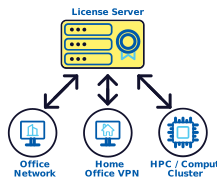
Server-based licenses:
-
are typically for purchased Schrödinger software
-
are installed on one machine (the license server)
-
will be used by the machines running the software (the “client machines”)
-
client machines may be on an office network, connected from home, part of a cluster, or the License Server itself if Using Schrödinger software on the License Server
-
New and existing Schrödinger customers who are running Schrödinger License Manager (SLM) for the first time must set-up, install, and deploy SLM. There are two ways this can be done:
Customers who have Schrödinger software installed and will be licensing on the same machine can: |
Customers who are setting up a dedicated licensing server that won't be used for running Schrödinger applications must: |
|
Set-up SLM with Quick Install Script |
or |
Set up the licensing directory
and
Install your first Schrödinger licenses and configure the system service
|
Other SLM administrative actions:
Install new licenses on an existing SLM server
Configure a test license server
Uninstall SLM with Quick Uninstall Script
Questions?
Contact help@schrodinger.com