SLM in Schrödinger Cloud
Customer Requirements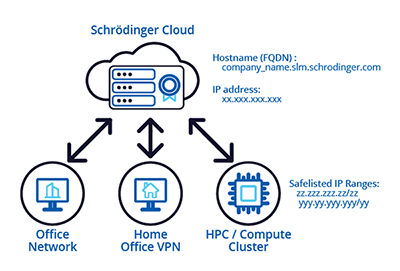
Schrödinger offers an optional paid service, SLM Cloud.
SLM Cloud provides a managed licensing solution for Schrödinger software. Schrödinger maintains the server, updates licenses, and troubleshoots any server-side issues.
To use SLM Cloud, customers need to configure their client machines to access licenses from the hosted server and work with Schrödinger to make the necessary security adjustments for communication between the clients and the server.
To utilize SLM Cloud, customers must fulfill the following requirements:
1. Network configuration and firewall requirements
-
Firewall: The Schrödinger-hosted license server will be assigned a fixed name and IP address, which Schrödinger will share with you when the server has been deployed. All machines where Schrödinger license checkouts occur must be able to connect to the SLM Cloud license server. The organization's network / firewall must allow access to TCP port 53000 of the SLM cloud server for these machines. Only IPv4 is supported.
-
Static Exit IP Addresses: Your organization must have a well-defined set of static exit IP addresses. Personal VPNs or home IP addresses are not supported for client machines checking out licenses. The specific setup method depends on your IT infrastructure (cloud, clusters, proxies, or services like Zscaler). Ultimately, configuring this static IP range is the customer's responsibility.
-
Provide Exit IP Addresses to Schrödinger: You must provide the exit IP addresses preferably in CIDR notation to Schrödinger for safelisting via help@schrodinger.com.
2. Determining IP Addresses for Safelisting
Customer IT should provide the list of public/exit IP addresses for machines that will be running Schrödinger software. You can find the public-facing IP address of a specific machines using the following:
Windows
In a Schrödinger Command Prompt, enter:
wget ipinfo.io/ip -O - -q
Mac / Linux
In a Terminal, run:
curl ipinfo.io/ip
Web Browser (on the machine where the jobs will be run)
3. Testing Access
After configuring your network and firewall and sending the IP addresses to be safelisted, you can test that the license server is accessible from a client machine using an SLM enabled Schrödinger Suite release:
Linux/MacOS, run:
$SCHRODINGER/run lictool test-server -f MMLIBS <hostname>:53000
(should report "success")
$SCHRODINGER/run lictool status --licsrv-hostport <hostname>:53000
(should list all features available on server)
Windows Schrödinger Command Prompt:
lictool test-server -f MMLIBS <hostname>:53000
(should report "success")
lictool status --licsrv-hostport <hostname>:53000
(should list all features available on server)
Replace <hostname> with the actual hostname of your SLM server.
4. Client Machine Configuration
Instructions for configuring individual machines as clients of the license server can be found here: Client Machine Set-up .
For any questions or assistance, please contact help@schrodinger.com.